QR codes
Download a product's "View in your room" QR code as a PNG - for print, packaging, shelf labels and your own pages.
Every product has a QR code that opens it in your shopper's room. GET /v1/products/{id}/qr
answers it as a square PNG, ready for a swing ticket, a catalogue page or a shelf label.
What the code opens
The code encodes the product's hosted viewer page - the product's viewer_url, for example
https://www.viewrium.com/viewer/3f2a1b4c-5d6e-4f70-8a9b-0c1d2e3f4a5b. On a phone that page shows
the product and its "View in your room" button. The code carries nothing else: no key, no ticket,
nothing that expires, so a printed code keeps working.
You can download the code at any time, also before the product is published, so it can go to
print before launch. The page it opens answers only while the product is published. Every QR
response says which applies in its Viewrium-Published header (true or false).
Two layouts
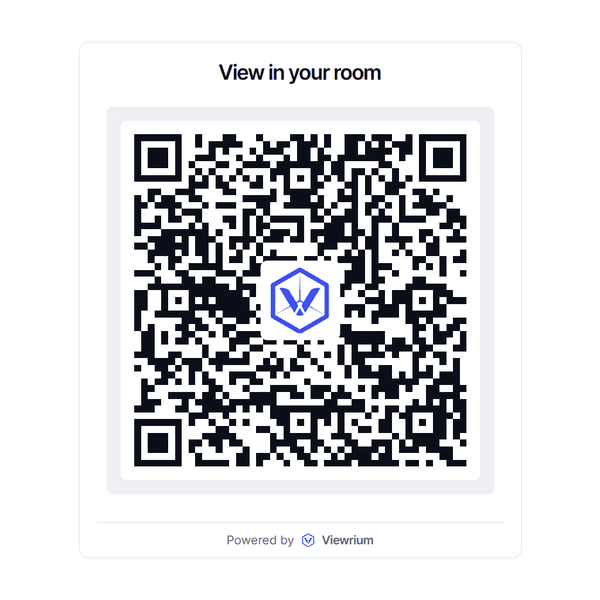
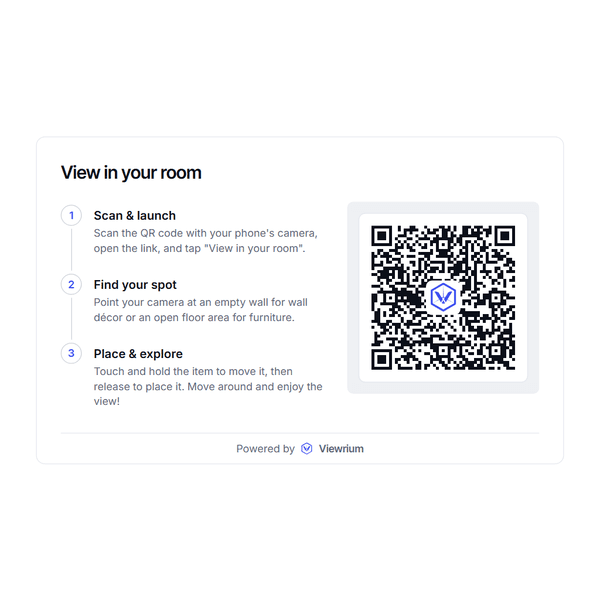
Both are square, on white, with the Viewrium mark in the middle of the code.
Minimal (default)
"View in your room" above the code and "Powered by Viewrium" below it - for small print and tight spaces.
Guide (guide=true)
The whole "View in your room" card your embed shows on a desktop: the three steps that tell a shopper what to do, beside the code. Use it where there is room to explain - a product page, a showroom sign, a catalogue spread.
Request
GET /v1/products/{id}/qr?guide=false&size=1024
Authorization: Bearer sk_live_...| Parameter | Default | |
|---|---|---|
guide | false | true for the card with the steps, false for the minimal layout. |
size | 1024 | The square's edge in pixels, from 256 to 2048. Use 2048 for print. |
The answer is image/png. A secret key or a dashboard session can download the code of any product
in its organization; a publishable key cannot (403). A product you cannot see is a 404, a
size outside the range a 422, and a 503 (service_unavailable) means codes cannot be
drawn right now - try again shortly.
With the SDKs
import { writeFile } from "node:fs/promises";
import { Viewrium } from "@viewrium/sdk";

const client = new Viewrium({ apiKey: process.env.VIEWRIUM_SECRET_KEY! });

// The minimal code at the default 1024 px.
await writeFile("chair-qr.png", await client.products.qr(productId));

// The card with the steps, at print size.
await writeFile("chair-qr-guide.png", await client.products.qr(productId, { guide: true, size: 2048 }));
products.qr resolves to the PNG's bytes as a Uint8Array. In a browser, wrap it in a Blob:
new Blob([bytes], { type: "image/png" }).
from pathlib import Path
from viewrium import Viewrium

client = Viewrium(api_key="sk_live_...")

# The minimal code at the default 1024 px.
Path("chair-qr.png").write_bytes(client.products.qr(product_id))

# The card with the steps, at print size.
Path("chair-qr-guide.png").write_bytes(client.products.qr(product_id, guide=True, size=2048))
products.qr returns the PNG as bytes. To check the code will open, read the product's
published field (or the Viewrium-Published header on a raw request).